Saturday, July 17, 2010
iOS 4.0.1 has been released for iPhone 4, 3GS and 3G. While the iPhone 4 and 3GS users will have to wait for a new jailbreak tool, iPhone 3G users who doesn’t rely on an unlock can jailbreak their phone on iOS 4.0.1 using Redsn0w 0.9.5b5-5. Again, this is strictly for iPhone 3G only. If you rely on ultrasn0w carrier unlock, DO NOT update to iOS 4.0.1 until further notice.
Step 1: Download iOS 4.0.1 for your version of iPhone. Download links are posted here.
Step 2: Update to this latest firmware using the IPSW file you just downloaded via iTunes 9.2.
Step 3: Start Redsn0w 0.9.5b5-5 (download link given below) and point it to iOS 4 (Final Version), and not iOS 4.0.1 firmware file to proceed with the jailbreak.
Step 4: Now select “Install Cydia” and click “Next”.
Step 5: Now make sure your device is both OFF and PLUGGED IN to the computer before you click “Next”.
Step 6: Connect your device in recovery mode by pressing the Power and buttons continuously.
At this stage you will be presented with a screen where you will have to quickly hold “Power” button and then while holding the “Power” button, you will now have to hold “Home” button too. Now after few seconds release “Power” button but keep holding “Home” button until installation begins.
Step 7: Sit back and enjoy while redsn0w will do all the rest for you. Once done, your iPhone and/or iPod touch will restart automatically and you will find it jailbroken on the latest iOS 4.1 firmware.
iOS 4.0.1 for iPhone 3G
http://appldnld.apple.com/iPhone4/06...6_Restore.ipsw
REDSN0W WINDOWS
http://rapidshare.com/files/40393602...5b5-5.zip.html
REDSN0W MAC
http://rapidshare.com/files/40393513...5b5-5.zip.html


Sn0wbreeze 1.8 has been released. This is by the same developer who is behind other popular iPhone jailbreak tools such as sn0wbreeze 1.6 and 1.7 for iOS 4, sn0wbreeze for iPhone 3.1.3, f0recast and BlackBreeze. Just like the PwnageTool for Mac, Sn0wbreeze 1.8 can jailbreak iPhone 3GS (old bootrom, and already pwned on iOS 4.x), iPod touch 2G (non MC model) and iPod touch 3G on iOS 4.1 Beta. iPhone 3G users will have to jailbreak using Redsn0w, guide for which is posted here.
So if you have a Windows machine, you can use Sn0wbreeze 1.8 to create custom firmware files without the upgraded baseband. Again, only the following devices are supported.
* iPhone 3GS (old bootrom and already jailbroken on iOS 4.x)
* iPod touch 2G (non MC model)
* iPod touch 3G
Warning: If you rely on an unlock, DO NOT update to iOS 4.1.
Instructions are as follows.
Step 1: Download and install the latest version of iTunes.
Step 2: Now start iTunes and sync your iPhone with your PC so that it backs-up all your important data including settings, apps, music, contacts and photos.
Step 3: Download Sn0wbreeze and the original iOS 4.1 firmware file for your version of iPhone or iPod touch. Move all these files to your desktop.
Step 4: Start Sn0wbreeze and select “Simple Mode”.
Step 5: Sn0wbreeze will now ask you to browse for your .ipsw file. Select the correct iOS 4.1 firmware .ipsw file by clicking the “Browse” button. Sn0wbreeze will verify the selected file and then will present you with following screen.
Step 6: Click on "Yes" when Sn0wbreeze asks you “Do you want to activate your iPhone?” for hacktivation. Click on “No” only if you are on an officially supported carrier like AT&T.
Step 7: Sn0wbreeze will now create the custom .ipsw file for your iPhone which will be jailbroken.
Step 8: Now you will have to restore your iPhone to this custom firmware 4.1 that you just cooked using Sn0wbreeze for your iPhone. Click on your phone from the sidebar in iTunes and then press and hold left “Shift” button on the keyboard and then click on “Restore” (Not “Update” or “Check for Update”) button in the iTunes and then release the “Shift” button.
This will make iTunes prompt you to select the location for your custom firmware 4.1. Select that custom .ipsw file and click on “Open”.
Step 9: Now sit back and enjoy as iTunes does the rest for you. This will involve a series of automated steps. Be patient at this stage and don’t do anything silly. Just wait while iTunes installs the new iOS 4.1 on your iPhone. Your iPhone screen at this point will be showing a progress bar indicating installation progress. After the installation is done, iPhone will restart automatically and you should now have a fully jailbroken iPhone running on iOS 4.1.
Step 10: Once you are done with the jailbreak process. You can now restore all your settings, apps, music, contacts and photos to the newly installed iOS 4.1 by restoring the backup that you made in Step 2 from iTunes.
Feel free to ask me any question here should you run into any problem during the jailbreak process.
Download iTunes 9.2 for Windows and Mac OS X
Download iOS 4.1 for iPhone 3GS, iPhone 3G and iPod touch
Download .NET Framework 3.5 (required to run Sn0wbreeze)
Download Sn0wbreeze 1.8 (Windows Only) [Fast Mirror link]
Jailbreak iOS 4.1 with Sn0wbreeze [Custom Firmware Windows] | Redmond Pie
Sn0wbreeze 1.8 has been released. This is by the same developer who is behind other popular iPhone jailbreak tools such as sn0wbreeze 1.6 and 1.7 for iOS 4, sn0wbreeze for
iPhone 3.1.3, f0recast and BlackBreeze. Just like the PwnageTool for Mac, Sn0wbreeze 1.8 can jailbreak iPhone 3GS (old bootrom, and already pwned on iOS 4.x), iPod touch 2G (non MC model) and iPod touch 3G on iOS 4.1 Beta. iPhone 3G users will have to jailbreak using Redsn0w, guide for which is posted here.
Jailbreak iPhone 4.1 iOS on iPhone and iPod touch 2G [How to Guide] | Redmond Pie
So if you have a Windows machine, you can use Sn0wbreeze 1.8 to create custom firmware files without the upgraded baseband. Again, only the following devices are supported.
iPhone 3GS (old bootrom and already jailbroken on ISO 4X
Download iOS 4.0 for iPhone 4, 3GS, 3G and iPod touch [Final Version] | Redmond Pie
IPOD TOUCH 2G (NON MC MODEL)
Jailbreak iOS 4 iPod touch 2G [How to Guide] | Redmond Pie
Warning: If you rely on an unlock, DO NOT update to iOS 4.1.
Instructions are as follows.
Step 1: Download and install the latest version of iTunes.
Step 2: Now start iTunes and sync your iPhone with your PC so that it backs-up all your important data including settings, apps, music, contacts and photos.
Step 3: Download Sn0wbreeze and the original iOS 4.1 firmware file for your version of iPhone or iPod touch. Move all these files to your desktop.
Step 4: Start Sn0wbreeze and select “Simple Mode”.
Step 5: Sn0wbreeze will now ask you to browse for your .ipsw file. Select the correct iOS 4.1 firmware .ipsw file by clicking the “Browse” button. Sn0wbreeze will verify the selected file and then will present you with following screen.
Step 6: Click on "Yes" when Sn0wbreeze asks you “Do you want to activate your iPhone?” for hacktivation. Click on “No” only if you are on an officially supported carrier like AT&T.
Step 7: Sn0wbreeze will now create the custom .ipsw file for your iPhone which will be jailbroken.
Step 8: Now you will have to restore your iPhone to this custom firmware 4.1 that you just cooked using Sn0wbreeze for your iPhone. Click on your phone from the sidebar in iTunes and then press and hold left “Shift” button on the keyboard and then click on “Restore” (Not “Update” or “Check for Update”) button in the iTunes and then release the “Shift” button.
This will make iTunes prompt you to select the location for your custom firmware 4.1. Select that custom .ipsw file and click on “Open”.
Step 9: Now sit back and enjoy as iTunes does the rest for you. This will involve a series of automated steps. Be patient at this stage and don’t do anything silly. Just wait while iTunes installs the new iOS 4.1 on your iPhone. Your iPhone screen at this point will be showing a progress bar indicating installation progress. After the installation is done, iPhone will restart automatically and you should now have a fully jailbroken iPhone running on iOS 4.1.
Step 10: Once you are done with the jailbreak process. You can now restore all your settings, apps, music, contacts and photos to the newly installed iOS 4.1 by restoring the backup that you made in Step 2 from iTunes.


Wednesday, July 14, 2010
Finally! After weeks of hard work, MuscleNerd and PlanetBeing (of Android port for iPhone fame) of the iPhone Dev Team has managed to unlock the new iPhone 4 running on iOS 4. For those of you who don’t know, carrier unlock for US iPhone 4s on AT&T required complete rewrite of ultrasn0w software because of the new baseband OS in iPhone 4.

Looks like I now have an unlocked iPhone 4.And now that we have both the next version of Spirit like all iOS device userland jailbreak, and unlock for iPhone 4 ready, the wait is now probably for Apple to push the next firmware update i.e. iOS 4.0.1 / 4.1 for iPhone 4, iPhone 3GS and 3G before these jailbreak and unlock tools are made available for public consumption. Stay tuned as will let you know whenever these new tools are available for primetime use! [via Twitter]
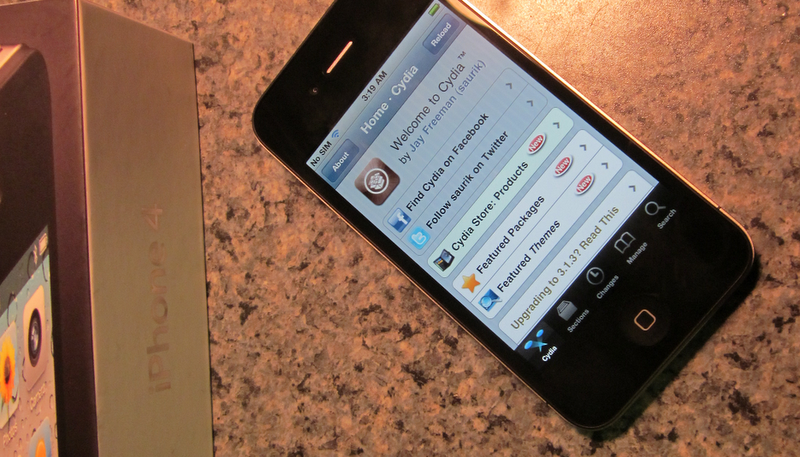
My soft-unlocked iPhone 4 (in Canada). I’ll have video in a couple of hours once I can top-up the SIM. http://twitpic.com/24ycdv
UPDATE 1: Another image has been posted, this time with Cydia open.

UPDATE 2: Here is a video proof of it in action:
Tuesday, July 13, 2010
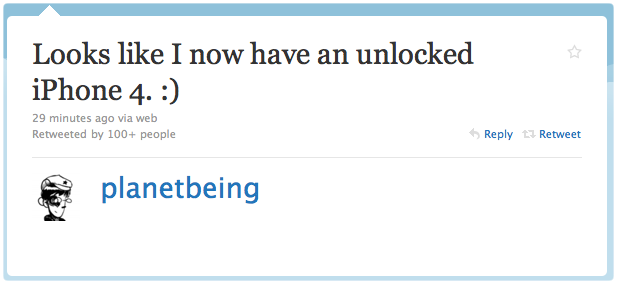
Finally! After weeks of hard work, MuscleNerd and PlanetBeing (of Android port for iPhone fame) of the iPhone Dev Team has managed to unlock the new iPhone 4 running on iOS 4. For those of you who don’t know, carrier unlock for US iPhone 4s on AT&T required complete rewrite of ultrasn0w software because of the new baseband OS in iPhone 4.
| Looks like I now have an unlocked iPhone 4. My soft-unlocked iPhone 4 (in Canada). I’ll have video in a couple of hours once I can top-up the SIM. My soft-unlocked iPhone 4 (in Canada). I'll have video in a c... on Twitpic |
UPDATE 1: Another image has been posted, this time with Cydia open.
Link to original article on Redmond Pie
EDITED BY MONSIEURTALBOT & HOWARD1 FOR THE HOME PAGE!
Sunday, July 11, 2010
Let's face it, the iPhone isn't really a "phone": to call someone you have to:
1) turn it on 2) unlock it 3) exit Safari ;P
4) find the Phone app 5) click the icon
6) find contact 7) call. Frowny pants.
With CyDialer, we have a phone again:
1) turn it on 2) find contact 3) call.
Put simply: all of your Phone favorites are displayed in a fast coverflow of photographs, right on your lock screen.
CyDialer isn't really anything "new": others have made similar extensions, both for the iPhone and other devices.
What sets CyDialer apart, however, is its attention to detail and quality. The interface has been designed to blend smoothly into the existing lock screen experience with calculated usage of fade effects and animated transitions.
For users of the built-in keypad lock feature, CyDialer integrates with the mechanism one would expect, sliding the interface in and out seamlessly.
Careful attention has been made to issues of "pocket calling": tapping a contact does not immediately initiate a call until the user "slides to call"


DOWNLOAD:
Install Cydget first: http://www.multiupload.com/UG4H5DL6L8
Then Cydialer: http://www.multiupload.com/1G7UC0IH7L
Saturday, July 10, 2010
Got one of these in the mail today and figured I'd give it a shot.
As far as a release goes, it probably won't happen from me. limera1n is little more than a raindrop on a website; it was never mentioned by me previous to this post. pwned4life is a complete invention of some blogger in a basement somewhere. When I said pwned for life, I was referring to the original iPhone, 3G, and Touch; which of course are, by the aptly named PwnageTool.
Again, please don't ask for release dates. Every person that does makes me want to release a little bit less.
Friday, July 9, 2010
Sn0wbreeze 1.7 for 4.0 (for Windows) has been released. This release supports iPhone 3GS (old and new bootrom), iPhone 3GS, iPod touch 2G (MC and non-MC models), and iPod touch 3G. Though iPhone 3GS (new bootrom), iPod touch 2G (MC models) and iPod touch 3G will have to be either on 3.1.2 firmware, or will need to have their SHSH blobs saved for iOS 3.1.2 in order to successfully jailbreak these devices on iOS 4. Also the jailbreak for iPhone 3GS (new bootrom), iPod touch 2G (MC models) and iPod touch 3G on iOS 4 will be tethered, which means whenever you turn off your phone, you will need to re-connect it to a computer to be able to turn it back on.
READ FULL REPORT HOW TO HERE
Jailbreak iPhone 3GS iOS 4.0 New Bootrom with Sn0wbreeze | Redmond Pie

 Posts
Posts


